
Don’t miss out on any new features
Plugin news, updates and practical Shopware tips. Once a month.
Search keywords (the standard shopware field customSearchKeywords on the product) are ranked particularly highly in the storefront search index - they therefore have a significant influence on whether a product is found for a customer search. By default, however, editors lack suggestions when creating or maintaining a product. This quickly leads to variant chaos: „T-shirt“, „Tshirt“ and „T Shirt“ all end up as independent terms in the index and fray the search.
The „Manage search keywords centrally“ plugin provides two tools to keep the keyword assignment consistent:
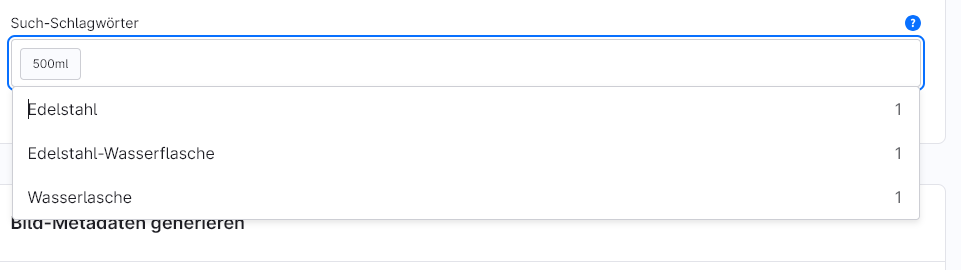
- Live suggestions in the product editor - When typing, all keywords already used on other products appear, including a frequency counter.
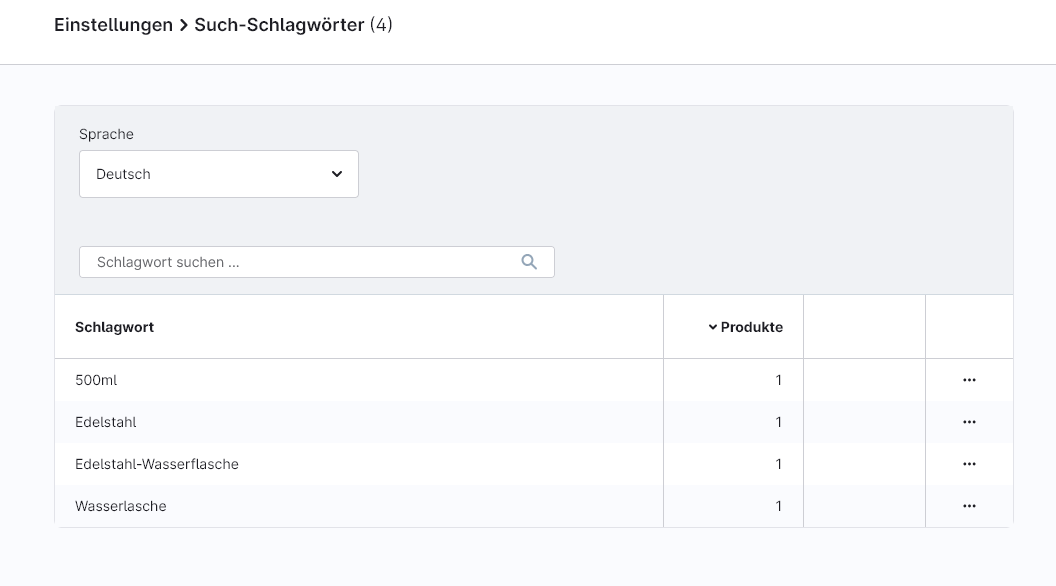
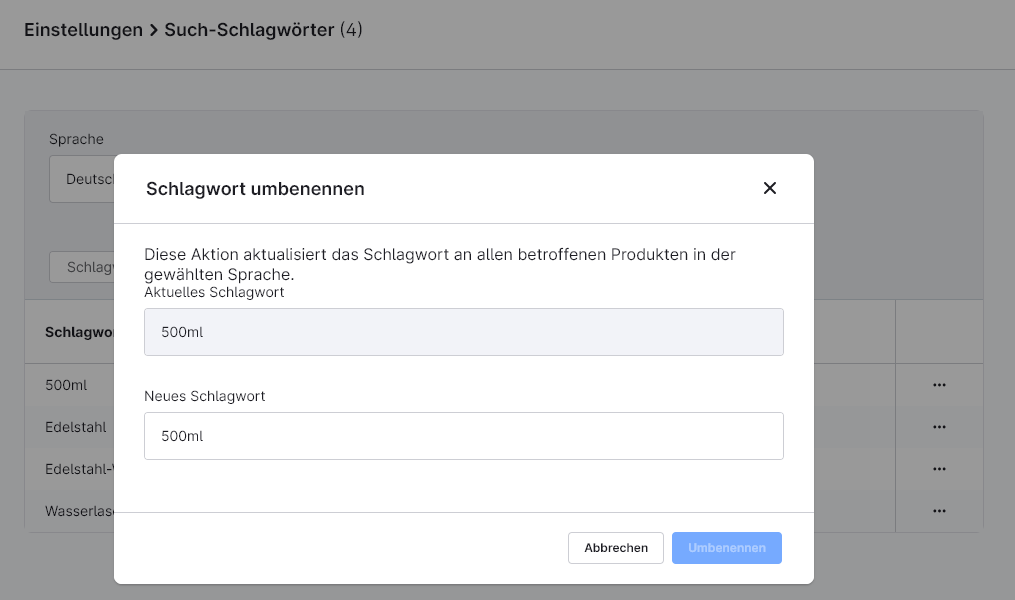
- Central administration in the settings - Overview of all assigned keywords with the actions „Rename“ and „Delete“, which affect all affected products simultaneously.
Prerequisites
- Shopware 6 with access to the administration.
- No external services or API keys required.
- No migration necessary - existing keywords appear immediately in the overview.
Compatibility
- Uses the standard product field customSearchKeywords - No interventions in the data kernel, no third-party plug-in dependencies.
- Fully compatible with OpenSearch.
- The storefront search index is updated automatically, as the Shopware standard indexer also writes during the DAL update.
Installation
- Purchase or rent the extension in the Shopware Store.
- In the Shopware backend under Extensions → My extensions install and activate.
- Clear the cache and reload the backend once (F5).
1 - Suggestions in the product editor
When maintaining a product, keywords that have already been assigned are suggested directly so that editors can adopt the canonical spelling with a single click - instead of typing a new variant.
- Where: Product → Tab General → Area Search keywords.
- What: When tapping, a dropdown appears with all the keywords already used on other products, including a counter showing the frequency.
- Takeover: Clicking on a suggestion immediately adds the keyword to the product.
2 - Central administration
The central overview page bundles all keywords used in the shop and allows them to be renamed or removed for all affected products in a single step.
- Where: Settings → Contents → Search keywords.
- Overview: List of all keywords with the number of products for which they are stored.
- Filter & Search: Language filter and full text search to quickly narrow down the list.
- Rename„ action: Changes the keyword on all affected products in a single step - ideal for standardising variants.
- Delete„ action: Removes the keyword from all products at the same time.
FAQs
Support
If you have any questions or problems, please do not hesitate to contact us:
- Support request: biloba-it.de/shopware-plugin-support
- e-mail: support@biloba-it.de
- Phone: +49 (0) 711 - 13633800
 German
  English