
Don’t miss out on any new features
Plugin news, updates and practical Shopware tips. Once a month.
TikTok Pixel & Events API (Conversion API)
This plugin allows you to seamlessly integrate the TikTok Pixel into your Shopware shop and also transmit all relevant shop events on the server side via the TikTok Events API (Conversion API). This enables you to measure your TikTok campaigns accurately – in compliance with data protection regulations and only once cookie consent has been given.
- Client-side TikTok Pixel and server-side Events API (Conversion API)
- Deduplication of browser and server events using a shared event ID
- Standard events: ViewContent, AddToCart, InitiateCheckout, AddPaymentInfo, CompletePayment and Search
- Enhanced matching using email addresses and telephone numbers hashed on the server using SHA-256
- A unique Pixel ID and Events API token for each sales channel, as well as the ability to specifically exclude individual customer groups
Prerequisites
- An active TikTok for Business account with a pixel set up and access to the Events Manager
- For the server-side Events API, you will also need an Events API access token from the TikTok Events Manager
- Shopware 6.7
- An active cookie consent manager (Shopware’s standard option or a supported external tool) to ensure that the pixel is loaded in compliance with the law
Compatibility
The plugin is compatible with Shopware 6.7. The client-side pixel is loaded via the official TikTok Analytics code, whilst server-side data is transmitted directly from your shop to the TikTok Events API. No additional third-party plugins are required.
Installation
- Purchase the plugin from the Shopware Store and install it in your shop.
- Plugin at Extensions activate.
- Open the configuration and enter the TikTok Pixel ID (and, optionally, the Events API token) (see „Setup“).
- Clear the Storefront cache or refresh the page so that the pixel is displayed.
Furnishings
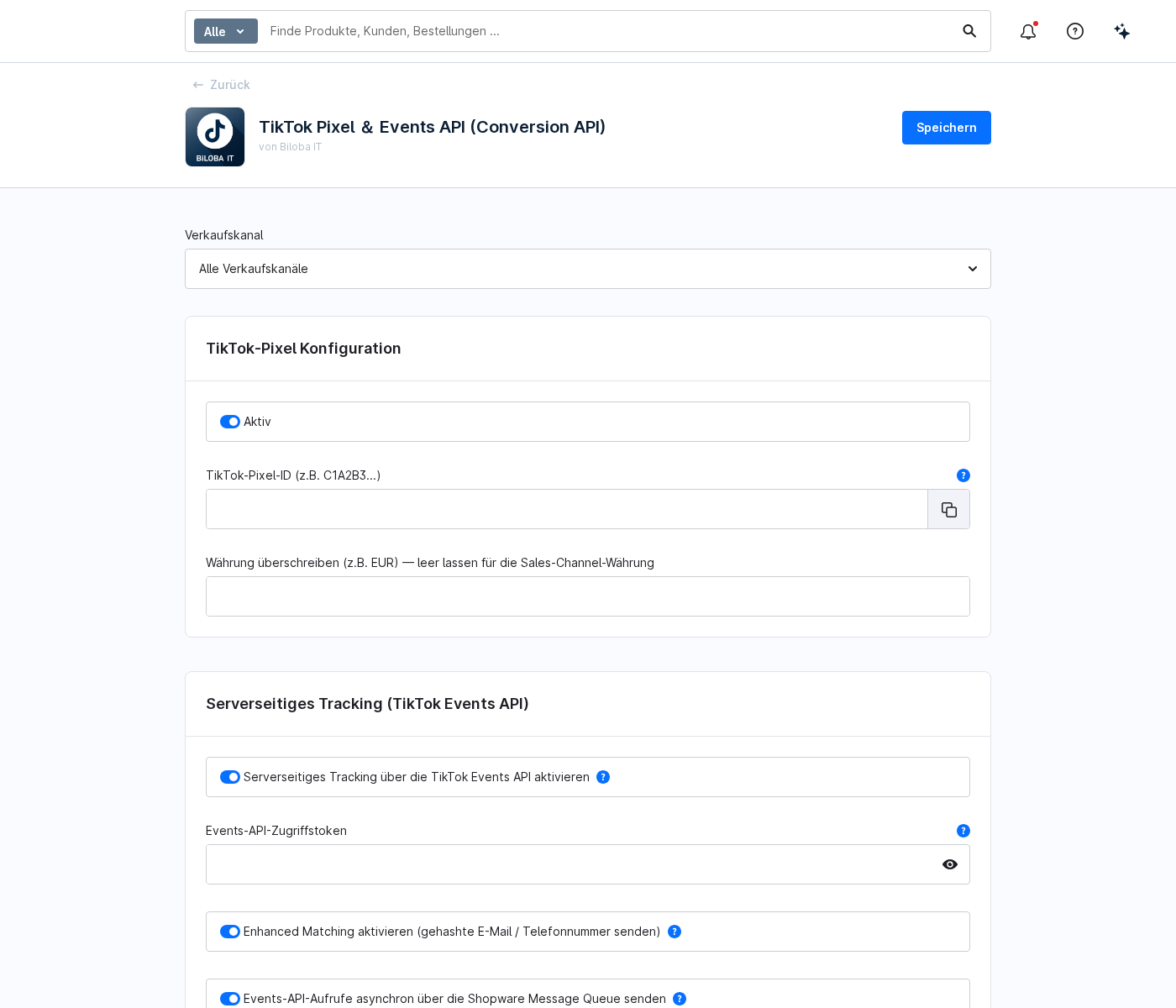
Open the plugin configuration at Extensions › My extensions under the entry „TikTok Pixel & Events API (Conversion API)“ via the three-dot menu › Configuration. Select the desired sales channel from the list above and configure the following settings:
- Active: Enables tracking for the selected sales channel.
- TikTok Pixel ID: Your pixel ID from the TikTok Events Manager (e.g. C1A2B3…).
- Server-side tracking via the TikTok Events API: Enables additional server-to-server transmission.
- Events API access token: The token generated in the TikTok Events Manager for the Events API.
- Override currency: Optional. Leave blank to use the sales channel’s currency, or specify a fixed currency (e.g. EUR).
1 · Events recorded
If tracking is enabled and consent has been given, the plugin automatically records the key events in the purchase process and reports them to TikTok:
- ViewContent: Product view
- AddToCart: Item added to your basket
- InitiateCheckout: Start of the ordering process
- AddPaymentInfo: Payment details saved
- CompletePayment: Completed order with turnover and currency
- Search: Search using the search term entered
e-commerce tracking can be enabled or disabled separately in the configuration.
2 · Server Events API & Enhanced Matching
In addition to the client-side pixel, the plugin transmits the same events on the server side via the TikTok Events API (Conversion API) directly from your shop to TikTok. Browser and server events share a common event ID, ensuring that TikTok reliably deduplicates them and counts each event only once.
Server-side tracking operates independently of ad blockers and browser restrictions, thereby ensuring significantly more reliable conversion measurement.
When Enhanced Matching is enabled, the plugin also sends hashed customer data (email and telephone number) to the Events API. Hashing is carried out on the server using SHA-256 – plaintext data never leaves your shop. This enables TikTok to attribute conversions to the correct users more reliably.
- Server-side tracking via the Events API: Enables server-to-server transmission.
- Enhanced Matching: sends hashed email addresses and telephone numbers.
- Sending Events API calls asynchronously: processes requests via the Shopware Message Queue without slowing down the storefront.
- Minutes: records the Events API calls in the Shopware logs for diagnostic purposes.
- Test event code: For testing purposes only. If code is entered here, the events will appear under „Test Events“ in the TikTok Events Manager. Leave this field blank in production.
3 · Cookie Consent & Data Protection
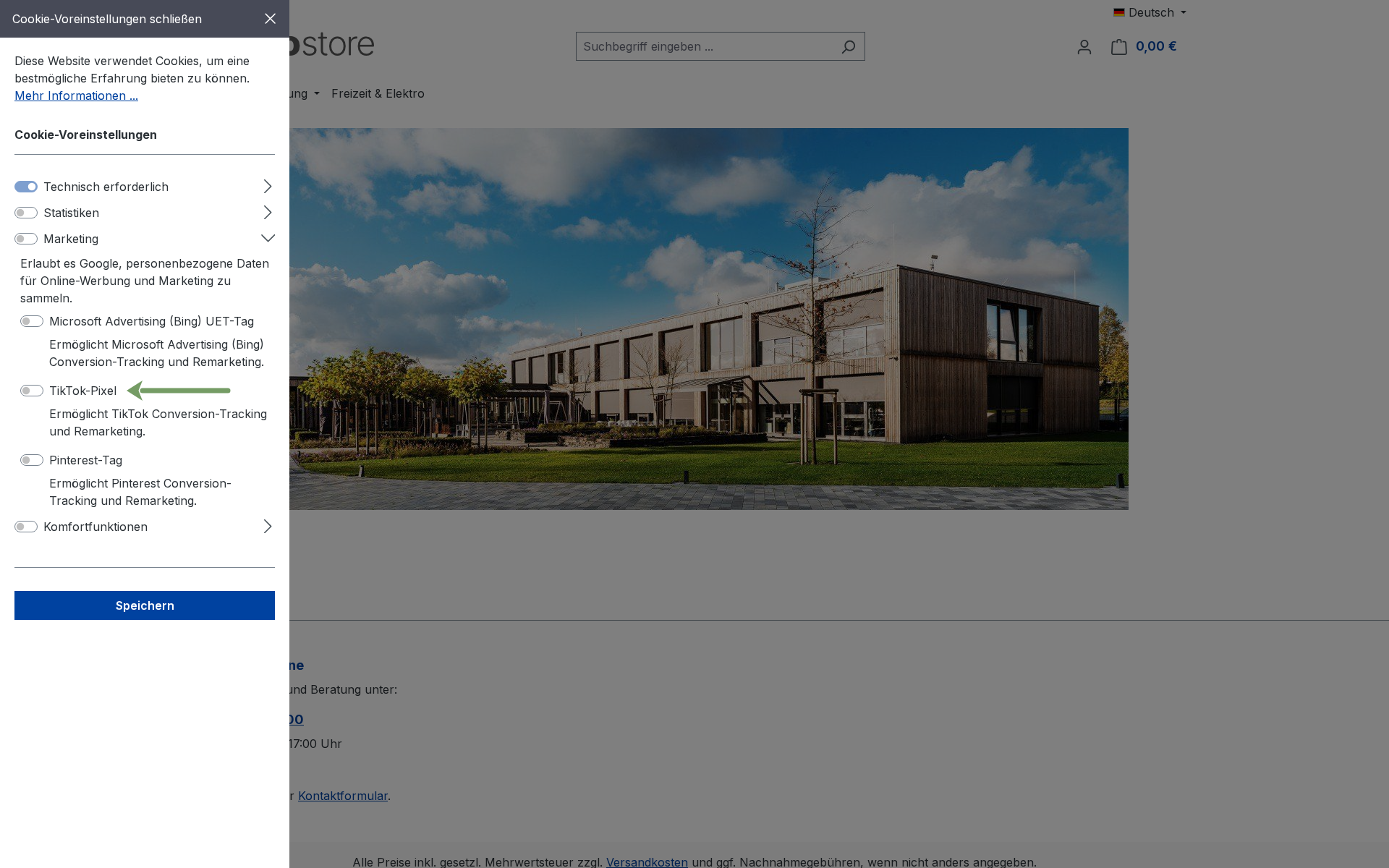
The TikTok pixel is only loaded once the visitor has consented to the „Marketing“ category. If consent is withdrawn, tracking stops.
The Shopware Cookie Consent Manager and seven external consent tools are supported:
- Cookie Bot
- CookieFirst
- UserCentrics
- ACRIS EU Cookie Policy Pro
- CCM19
- CMP
- CookieYes
For custom setups, you can freely define the data attribute used to suppress the TikTok pixel in the „Expert mode for the selected consent manager“ field (e.g. your CMP’s marketing attribute). For CMP (consentmanager.net), enter your TikTok vendor ID here.
Data protection notice: TikTok is operated by ByteDance; when using the app, data may also be processed outside the EU. Please inform your visitors of this in your privacy policy and obtain valid consent.
4 · Multiple sales channels & other options
- Multiple sales channels: Select the relevant sales channel at the top of the configuration and enter a separate pixel ID and events API token for each channel.
- Own events: In the „Custom Events“ field, you can define additional events on each line in the format „route_name = EventName“. Omit the route (use „EventName“ only) to trigger the event on every page. Lines beginning with # are ignored.
- Gross/Net: Specify whether turnover is to be reported as gross or net.
- Order value: Please state the order value, including or excluding delivery charges.
- Exclude customer groups: Under „Disable tracking for the following customer groups“, you can exclude individual customer groups (e.g. retailers or internal groups) from tracking.
- 24 languages: Administration and storefront texts are available in 24 languages.
FAQs
Support
If you have any questions or problems, please do not hesitate to contact us:
- Support request: biloba-it.de/shopware-plugin-support
- e-mail: support@biloba-it.de
- Phone: +49 (0) 711 - 13633800
No solution found?
Describe your problem to us - we'll take a look at it and get back to you as soon as possible.
 German
  English