
Don’t miss out on any new features
Plugin news, updates and practical Shopware tips. Once a month.
From 27 September 2026, EU Regulation 2025/1960 will require new labelling in online retail. The ‘EU Warranty & Manufacturer’s Guarantee GARAN Label’ extension automatically adds the necessary labels to your shop; no code changes are required.
There are two different labels: The Warranty Notice (Annex I) provides information on statutory warranty rights and is mandatory for every product; it is displayed automatically and does not need to be updated. The GARAN warranty label (Annex II) also indicates voluntary manufacturer’s shelf-life guarantees of more than two years and is only displayed if you have entered the relevant guarantee details for the product or manufacturer.
- Harmonised warranty notice (Annex I) displayed automatically on every product detail page and at checkout
- GARAN guarantee label (Annex II) for products with a shelf life of more than two years
- Maintenance on a per-product basis or centrally by manufacturer, with the option to restrict this to specific categories
- Automatic language selection based on the shop’s language, in all 24 official EU languages
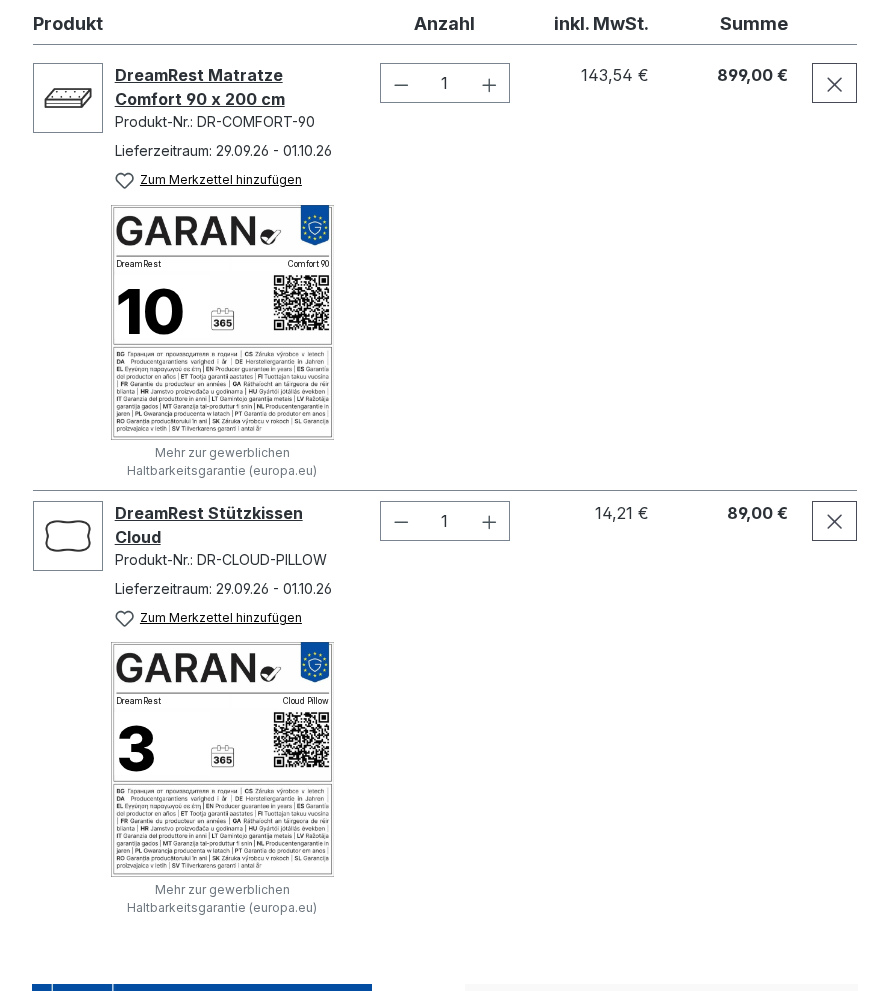
- Displayed at checkout for every qualifying shopping basket item, including in Quick Buy and when adding items to the basket from a listing
- Label PDF for every order: available to download from your customer account, optionally included as an attachment to the order confirmation, plus a module for your own email templates
Prerequisites
- From Shopware 6.5
- No external services or API keys required
- For the GARAN quality label: Maintain additional fields for the product or manufacturer (see the „Set-up“ section)
- The Label PDF after purchase It is available in versions for Shopware 6.6 and 6.7. It requires the GD PHP extension with FreeType support.
- The Warranty allocations (Different guarantees apply depending on the product group) are initially available in the version for Shopware 6.7. The changelog states whether they will follow for versions 6.5 and 6.6.
Installation
- Purchase the extension from the Shopware Store and install it in your shop.
- Under Extensions → My extensions activate.
- The warranty notice will then be active immediately on all product detail pages and during checkout; no further action is required.
- Next, complete the additional fields for the GARAN quality label (see „Set-up“).
Furnishings
You can manage the GARAN quality label in whatever way suits your product range: on a per-product basis or centrally by manufacturer.
- Per product: In the „Specifications“ tab, open the „EU Guarantee Label (GARAN)“ set of additional fields, confirm the guarantee, enter the duration in years (whole or half years; the label applies from 2.5 years), and enter the make and model code.
- Centralised by manufacturer: Register the warranty with the manufacturer once; optionally, narrow it down to specific categories using the clickable category tree (subcategories are automatically included).
- Test sequence: First, the data maintained for the product is taken into account; then any exclusions; followed by the warranty assignments; and finally the manufacturer’s rule. If the warranty is confirmed for the product, only the product data is taken into account, including the mandatory ‘Model ID’ field.
- Model code: If the manufacturer rule applies, it is automatically taken from the product’s manufacturer number; optionally, it may also be taken from the product number as a fallback.
- Exclusion: Individual products can be excluded from the manufacturer’s rule using an additional field.
- Variants take all the details from the main article, unless they have been maintained separately.
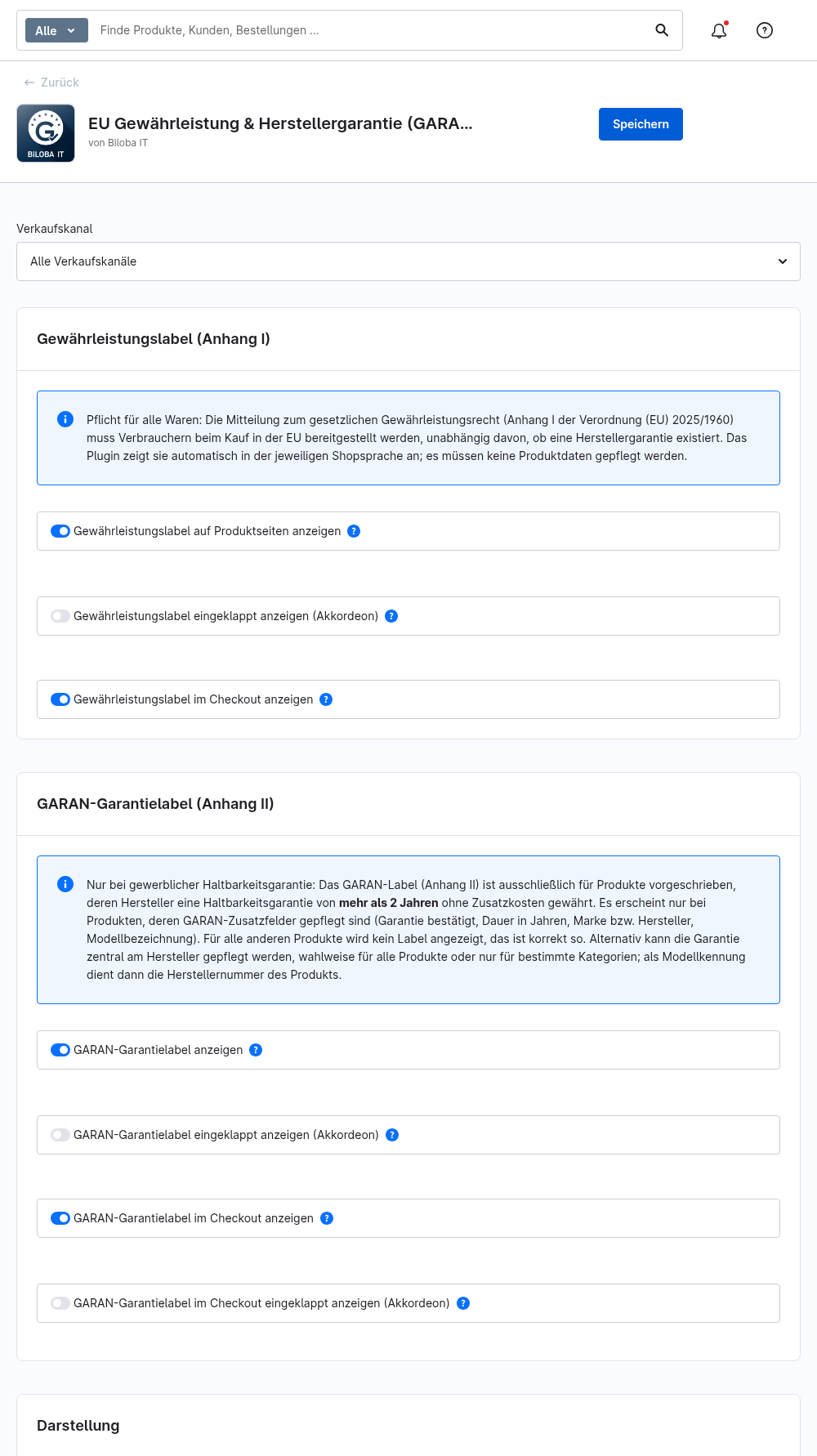
- Under Extensions → My Extensions → BilobaGaran → Configure The display, position on the product page and the accordion layout can be customised for each sales channel.
Warranty allocations: different warranties for each product group
If a manufacturer offers different warranties depending on the product category – for example, 10 years on mattresses and 3 years on pillows – you can map this using warranty assignments. You can find these in Shopware under Catalogues → GARAN warranty assignments (also available at Settings → Extensions).
Create one allocation per guarantee. For each allocation, you must set:
- Dynamic product group: specifies which items the guarantee applies to (for example, „Manufacturer is Brand A and category is mattresses“). Variants inherit this classification from the main item.
- Warranty period in years: Full or half years, more than 2 (labelled from 2.5 years).
- Priority: If several assignments apply to a single item, the one with the highest priority takes precedence.
- Rule (optional): narrows down the context, for example to a sales channel or a time period.
- Active switch: An assignment can be disabled without deleting it.
You can set up the dynamic product group in Shopware under Catalogues → Dynamic product groups to create a rule under Settings → Shop → Rules. The assignment form also includes links that take you directly to the page for creating a new product group or rule (in a new tab; the form remains open). When you save an active assignment, you are confirming that the manufacturer provides this guarantee for all the goods.
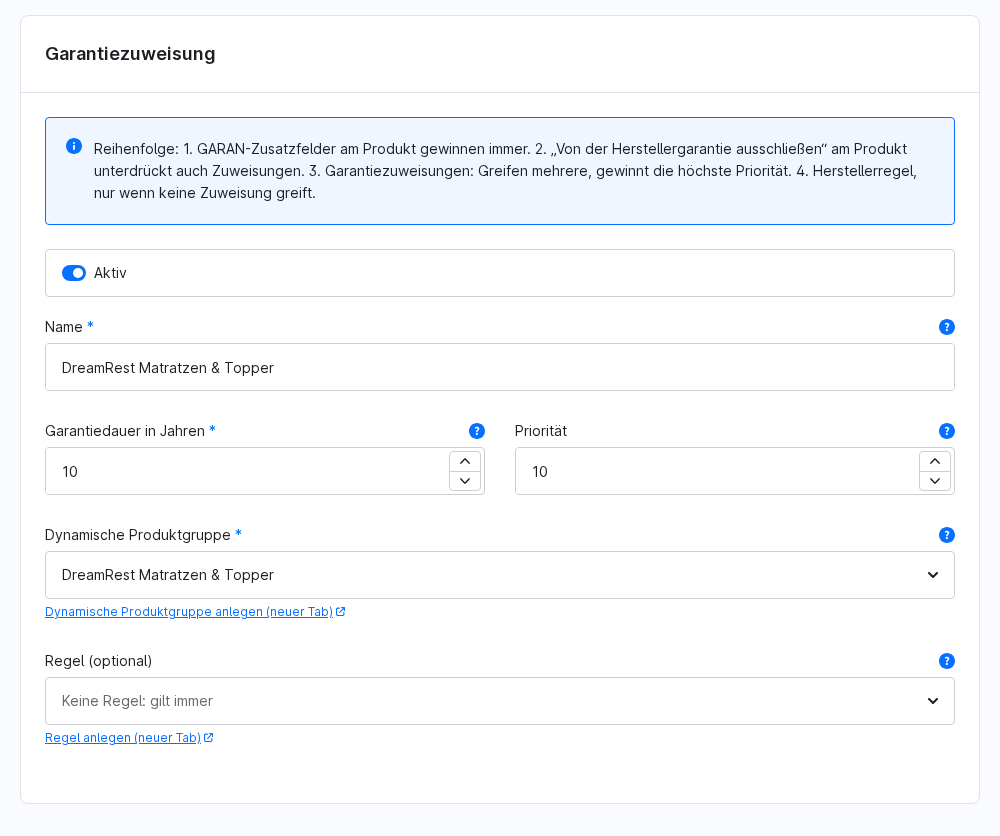
This means that different warranties may apply to items from the same manufacturer. At checkout, each qualifying item in the shopping basket is checked individually and displayed with its own label.
1 · Notice of warranty (Annex I)
Once activated, the official, non-editable message will automatically appear on every product detail page and on the checkout confirmation page. The language will match your shop’s language (all 24 official EU languages, with English as the fallback). The QR code provided links to the official „Your Europe“ portal and is also included as a standard link (for accessibility).
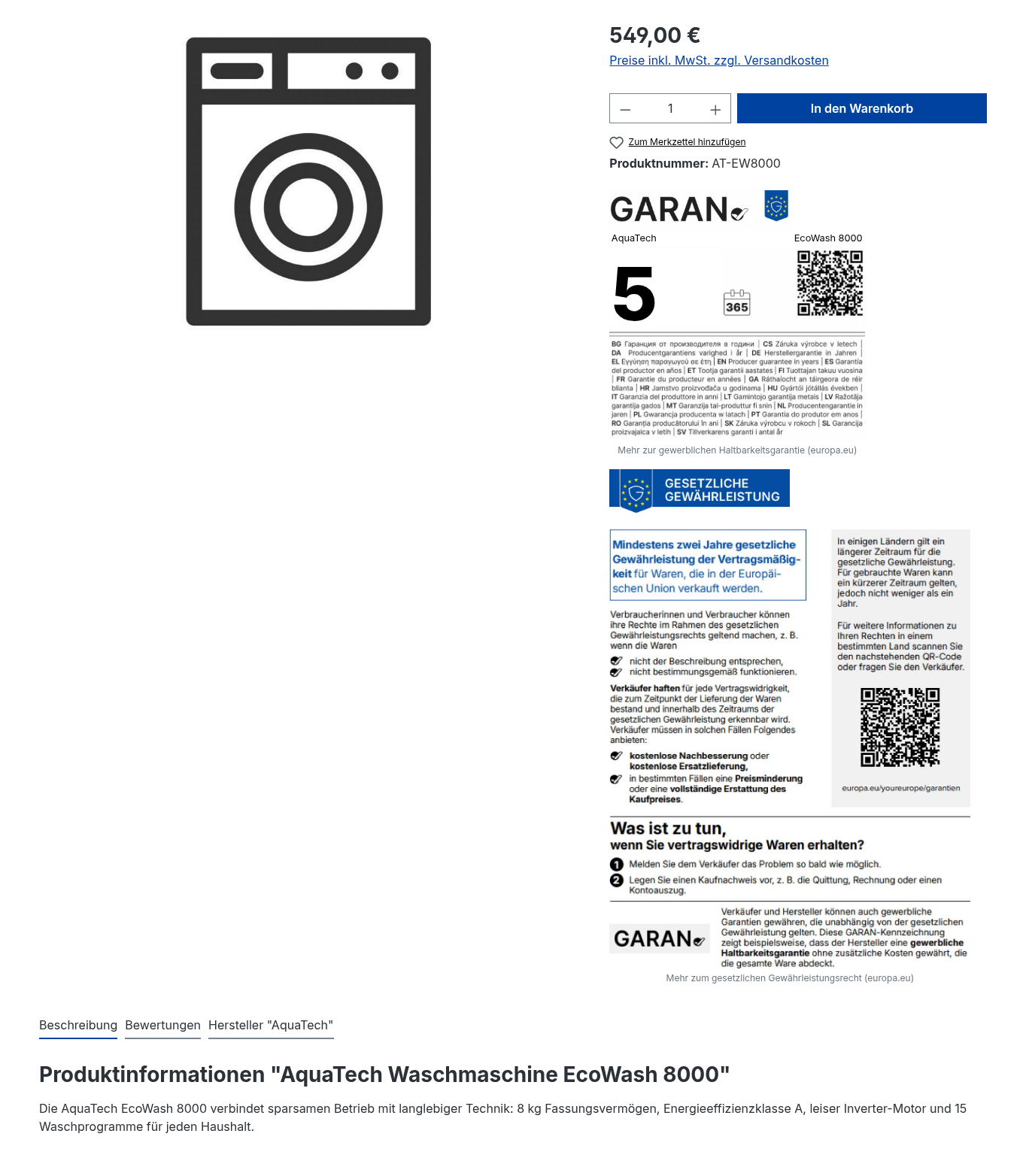
In „2 · GARAN guarantee label (Appendix II)“, you can see the message alongside the GARAN guarantee label, just as both labels appear by default directly below the ‘Buy’ box.
2 · GARAN guarantee label (Annex II)
The label graphic is taken directly from the Official Journal of the EU without any alterations. Only the three elements that may be edited in accordance with the Regulation are replaced: duration, brand and model identifier. A completeness check ensures that an incomplete or non-compliant label is never displayed. Variants inherit all relevant data from the main product, and the shop cache is automatically updated when changes are made.
The screenshot below shows the label alongside the warranty notice; by default, both appear directly one below the other on the product details page.
3 · Customise the display
- Position can be selected: below the ‘Buy’ box or below the product description
- Optional accordion view: only the official blue header banner is visible; the content expands when clicked (deliberate opt-in with a confirmation dialogue)
- Configuration is possible for each sales channel; both labels can be activated individually
4 · Display at checkout
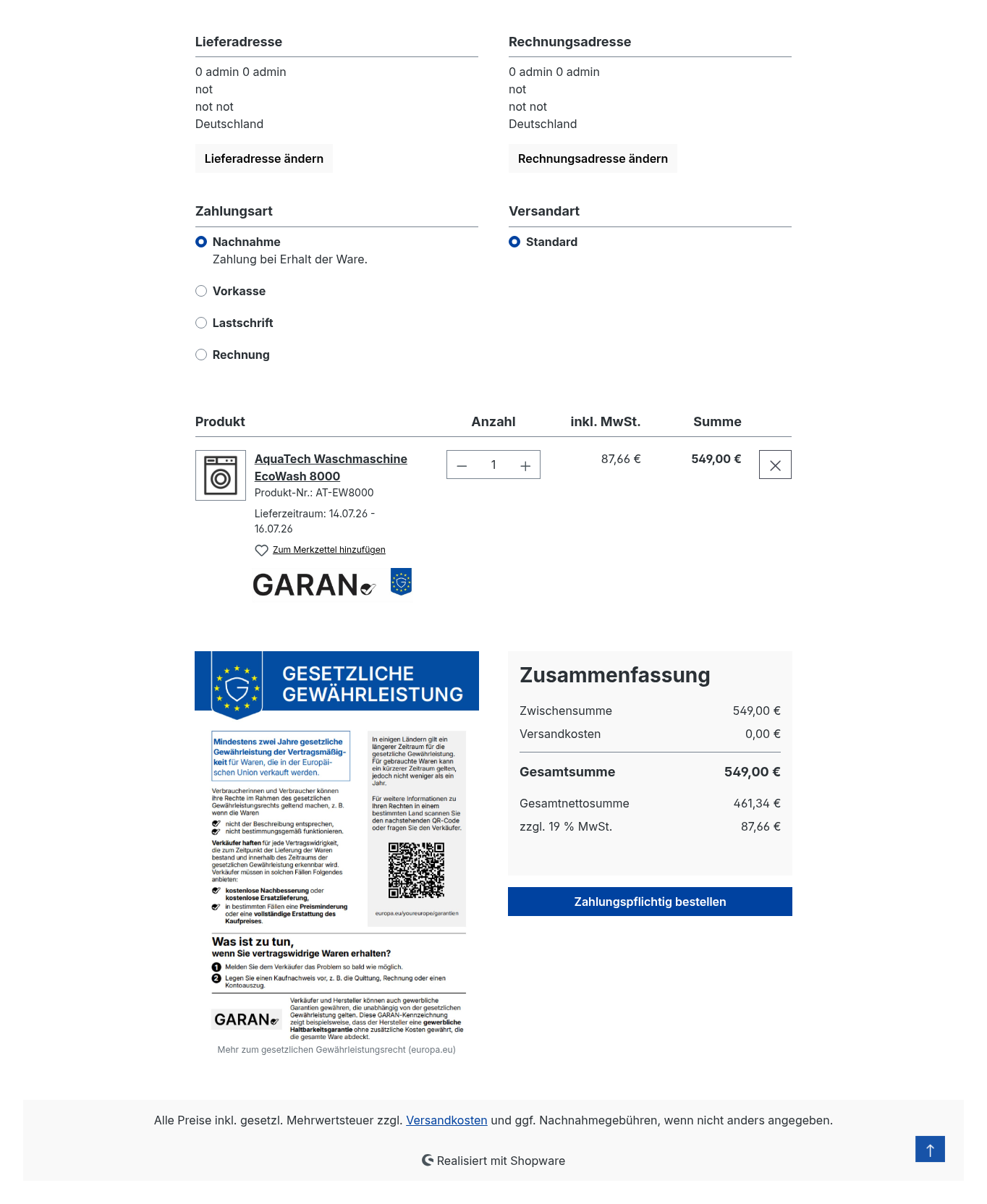
At checkout, the GARAN label appears in a space-saving format next to each eligible shopping basket item, whilst the warranty notice is clearly displayed alongside the order summary. This also covers purchase paths that bypass the product details page, such as ‘Quick Buy’ or adding items to the shopping basket directly from the product listing.
5 · Labelling after purchase
Overview
From 27 September 2026, the warranty notice and the GARAN label must be provided to the customer on a durable medium following the purchase. To this end, the extension generates a Label PDF: Appendix I (Warranty) appears once at the beginning, followed by a block for each item with a GARAN label, showing the item number, product name, product code, quantity and the label. Items without a warranty do not appear. If the order contains no items with a warranty, the PDF contains only Appendix I.
The label data is stored at every Orders are recorded at the time of purchase, regardless of your settings. Subsequent changes to the product, manufacturer or warranty allocation do not affect existing orders.
Settings for the „Order“ tab“
You can find the settings under Extensions → My Extensions → BilobaGaran → Configure in the „Order“ tab. They apply to each sales channel individually and inherit the value from „All sales channels“.
- Download labels from your customer account (Default: on): displays the download link in the order details and enables the link module for emails.
- Attach the label PDF to the order confirmation (Default: off): The PDF is generated when the order is completed and is attached to the order confirmation.
- Position limit for the PDF attachment (Default: 45): the maximum number of items with the GARAN label for which a PDF is generated and attached when the order is finalised.
Download via your customer account
Registered customers will find the link „Download warranty and guarantee label (PDF)“ in the order details and can download the PDF after logging in. Guests do not retain a persistent session after checkout. They open the link from the email and confirm using the email address and postcode of the billing address. Immediately after placing the order, the link works without any further prompts.
The PDF is generated when the order is completed (only if there is an attachment and within the item limit) or, otherwise, upon the first download. There is exactly one PDF per order, and it is not altered thereafter.
Appendix to the order confirmation
If the attachment is enabled, the extension attaches the PDF to the order confirmation sent via Flow. Attachment I is always included. The item limit acts as a safety net to prevent the storage limit from being exceeded and to stop emails from becoming too large; normal orders do not reach this limit. Only increase it with caution: setting the value too high risks the order not being completed and makes the email larger (approx. 0.19 MB per item).
Module for the email template
With this module, you can add a download link to your own email templates. It works in every order email, even when sent manually from the admin panel, where no PDF is attached. Add it to the order confirmation template under Settings → Shop → Email Templates.
HTML template, with the standard link text:
{{ biloba_garan_order_labels(order) }}HTML template with custom link text:
{{ biloba_garan_order_labels(order, 'Label als PDF herunterladen') }}Plain-text template (in this case, the module only provides the URL):
Warranty and guarantee labels: {{ biloba_garan_order_labels_url(order) }}The field remains blank if the download function is disabled, if the order was placed before the update, or if the sales channel does not have a domain. The email is then sent without a link. The link does not expire.
Borders
- Manual dispatch from the administration section: No PDF is attached there. Please use the module in the template for this.
- Above the position limit: There is no PDF attachment; the PDF is only generated the first time it is downloaded from the customer’s account. The requirement to provide the label with the order confirmation on a durable medium is therefore not met for these orders. A link is unlikely to serve as a substitute for the attachment.
- Orders placed before the update: You do not have a PDF, a link or an attachment. Nothing is generated retrospectively.
- Guests without a postcode Those with the billing address cannot access the download via the link; they can only do so via the email attachment.
- Technology: The PHP GD extension with FreeType support is required. If this is missing, the checkout process will continue, but no PDF will be generated.
Important before deactivating or uninstalling: If the module is included in an email template, Shopware will no longer recognise the function and will not send these emails. You should therefore remove the module from all templates before deactivating or uninstalling the extension.
Please note: The extension provides the label PDF. As the shop operator, it is up to you to assess whether an attachment or a link meets the requirements for your shop. This does not constitute legal advice.
FAQs
Support
If you have any questions or problems, please do not hesitate to contact us:
- Support request: biloba-it.de/shopware-plugin-support
- e-mail: support@biloba-it.de
- Phone: +49 (0) 711 - 13633800
 German
  English